

In the ever-evolving landscape of web development, the optimisation of images is a crucial aspect that significantly affects website performance. Traditional image formats like JPEG and PNG have long been the mainstays for web images, but the advent of the WebP format, developed by Google, has introduced a more efficient and versatile alternative. This blog post explores the advantages of using WebP over JPEG and PNG, with a focus on how compression tools like TinyPNG can further enhance these benefits.
Superior Compression and Quality
One of the most compelling reasons to adopt WebP is its superior compression capabilities. WebP supports both lossy and lossless compression, providing flexibility depending on the quality requirements of the image. In comparison, JPEG supports only lossy compression, while PNG is primarily used for lossless compression.
- Lossy Compression: WebP achieves an average of 25-34% smaller file sizes for comparable image quality than JPEG. This reduction is achieved through advanced compression algorithms that eliminate unnecessary data more efficiently.
- Lossless Compression: When compared to PNG, WebP can produce images that are 26% smaller on average. This makes it an excellent choice for images that require transparency, which is a significant advantage over JPEG, which does not support transparency at all.
Enhanced Performance and Speed
Smaller image sizes directly translate to faster loading times. For websites, this improvement in speed is crucial for enhancing user experience, reducing bounce rates, and improving SEO rankings. By adopting WebP, websites can load more quickly, especially on mobile devices where bandwidth may be limited.
Transparency and Animation
WebP combines the best features of JPEG and PNG. It supports transparency (like PNG) but with much smaller file sizes. Additionally, WebP also supports animation, similar to GIFs but with better compression, making it a versatile choice for various types of images on the web.
Compatibility and Support
While WebP was initially limited in browser support, it has now gained widespread acceptance across major web browsers, including Chrome, Firefox, Edge, and Opera. This widespread compatibility means that web developers can now confidently use WebP without worrying about users encountering unsupported images.
Compression Using TinyPNG
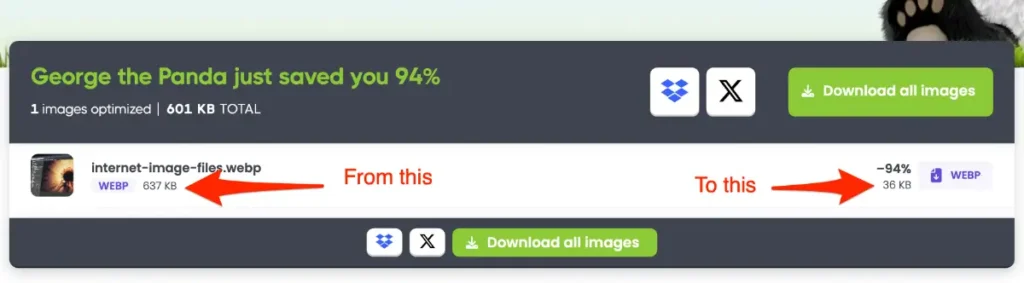
Although WebP offers impressive compression capabilities natively, tools like TinyPNG can further optimise images for even better performance. TinyPNG is renowned for its ability to compress PNG and JPEG images with minimal loss of quality, and it has extended its capabilities to support WebP as well.
Here’s how TinyPNG can enhance WebP images:
- Additional Compression: TinyPNG applies additional optimisation techniques that can reduce WebP file sizes further without sacrificing quality. This extra compression can be particularly beneficial for websites with a large number of images.
- Batch Processing: TinyPNG allows for batch processing of images, making it easier for developers to convert and compress multiple images in one go, saving time and effort.
- Ease of Use: The TinyPNG interface is user-friendly, making it accessible even to those with limited technical expertise. With drag-and-drop functionality and API support, integrating TinyPNG into a workflow is straightforward.
Switching to WebP image files offers numerous advantages over traditional JPEG and PNG formats. With superior compression, enhanced performance, and the ability to handle both transparency and animation, WebP is a versatile and efficient choice for modern web development. Leveraging tools like TinyPNG can further optimise WebP images, ensuring the smallest possible file sizes and the fastest loading times. As web standards continue to evolve, adopting WebP is a forward-thinking step that can significantly enhance website performance and user experience.